Home
Home

I honestly didn't think anyone would care about this thing:
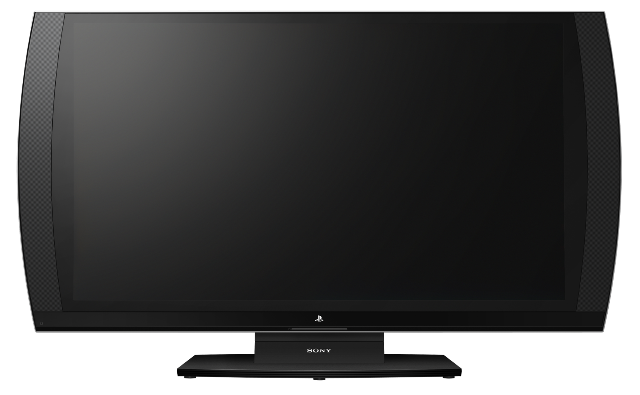
When Sony unveiled the PlayStation 3D Display at this past summer's Electronic Entertainment Expo trade show, I had one thought: "Wake me up when they announce a bigger one." I mean, seriously...a 24" monitor? Aren't we Americans used to (much) bigger and (much) better? Hell, my tech-snobby eyes don't acknowledge anything under 40" when perusing the HDTV aisles at Best Buy.
Then Sony sent us a model for review just a little ahead of its November 13 release. I casually Tweeted/Facebooked out that the 3D Display "...is very slick. Widescreen, smooth, decent sound. Looks like a giant PSP, too." I expected some people to scoff, mainly at its diminutive stature...or perhaps at its hefty $499.99 price tag.
Interestingly enough, replies to my Tweetbooking indicated that gamers are actually excited about the PS 3D Display. Some of my friends who tried it out at my pad really thought it was cool as well. And when my girlfriend caught me zoning out with the 3D glasses on, admiring the backgrounds in Ratchet & Clank: All 4 One for way, way longer than I had intended for Display-testing purposes ("You look stoned," she said), I realized I was enjoying bite-sized stereoscopic gaming. I guess it says something when I chose to spend time staring into this monitor when my 65-inch HD behemoth was slumbering just a few feet away.
Now, I'm no hardware expert. I'm not here to tell you how well the PlayStation 3D Display specs out or how compares to other televisions. But I checked out the machine with some friends, judging it in the various categories below (including the touted SimulView feature, which allows two players to see two different images on the same monitor, eliminating the need for splitscreen gaming)....
Initial impressions
The PlayStation 3D Display definitely passes the first-look test -- if this thing could walk, people would be rubbernecking to get a second glance. It is extremely thin (about 0.75" thick, not counting the base or the rear panel) and looks as though Apple could've designed it, with an ultra-minimalistic design. By the way, even though this is a 24" monitor, the official tech specs lists the effective screen size as 23.5", which takes up most of the front-facing real estate.
The rest of the frame houses the speakers and accents the unit nicely, adding no bulk or unsightliness. It's almost iPad-like in looks, with the rounded sides giving it a PSP vibe. One commenter, who works at Sony, agrees: "We've been saying that over here for weeks," says @Nikoro. "As if there are giant PSP Go buttons and control pad about to slide out from the back."
Almost everyone who's stopped by and looked at the Display thinks it looks mighty nice. "It's the perfect dorm-room gaming TV," says one of my friends.
Practicality
"Dorm-room gaming TV" may be the perfect role for the Display, as it's way too small to use as a typical family's primary window to electronic entertainment. It supports component video, has two HDMI ports, and also offers one headphone jack. So unless you're still rocking that Atari 2600, you should be OK, connection-wise.
If you end up buying the PS 3D Display, I would recommend springing for the not-included remote control. All of the default buttons are behind the monitor, out of sight (if you hit any, an on-screen menu will pop up, showing you what all the functions are in the back). The "volume-up" key has a little bump, so it's easier to find that one and feel the others out in relation to it, but it's still not easy to navigate any of the hardware menus to adjust things like the treble/bass/contrast/etc.
The glasses
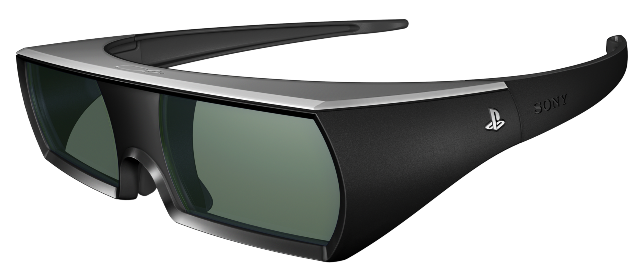
These are the larger, bulkier "active" glasses (vs. the passive ones you typically use in movie theaters) that Sony likes to use for their 3D TVs, only with a silver PlayStation logo on the side. They have adjustable nose pads, they fit over eyeglasses, and they apparently make you look like you might've been smoking pot.
It's easy to switch between first- and second-player modes (more on that below in the SimulView section), but I don't like that these each have two separate power switches. Don't ask -- I don't understand why these were designed this way.
The 3D
I don't want to say a lot here, because I haven't seen enough at-home 3D to do any honest, objective comparisons. Let's just say it works well on a handful of games that I tested out (All 4 One, MotorStorm Apocalypse, and Uncharted 3, the latter requiring a just-released patch to make the 3D work properly).
On some titles, you might need to scale back the 3D strength via in-game options. I usually want my 3D as in-my-face-and-eyes as possible, but setting this too high can cause some shadowing effects that make images look a little blurry. Toning this down will probably save you future trips to the medicine cabinet for aspirin.
SimulView
This feature easily amazed everyone who tried it during my testing, including myself. For games that support it (currently from Sony: MotorStorm Apocalypse, Gran Turismo 5, and Killzone 3), it essentially turns a two-player splitscreen experience into a fullscreen one.
The PlayStation 3D Display will output each player's image onto the screen at the same time, but setting the glasses to different modes (player one and player two) will make them filter out the other signal. That means each participant will only see his own game while peeping the same screen. Yes, it's a little like magic.
The image quality drops a bit in SimulView mode -- it's not as bright or vivid as a dedicated fullscreen picture, and it doesn't support stereoscopic 3D. But heck if I ever want to go back to sharing one television with someone else. It's just too bad Sony doesn't make it mandatory for developers to support this feature for all PS3 games.
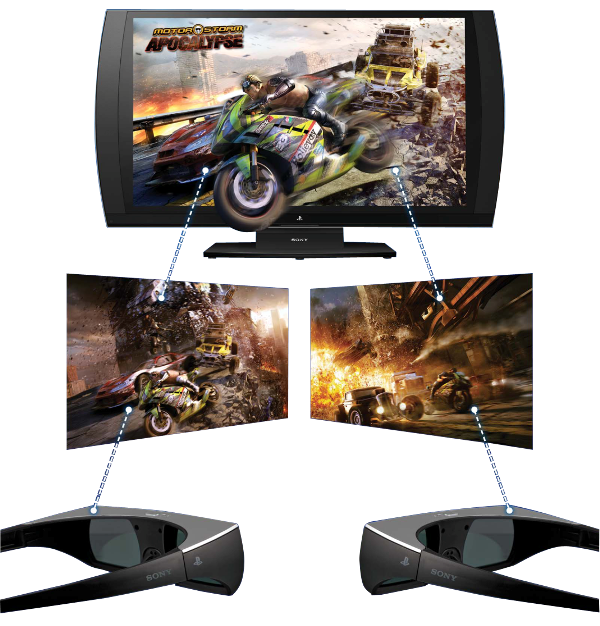
We'd Photoshop in some screenshots to show you a more realistic portrayal of how SimulView works, but this marketing image was just too ridiculous to not show you guys.